Most warehouse hardware conversations start with a specification sheet and end with a device that cannot do the job. The useful conversation starts on the floor: which task, which aisle, which label, which network, and what happens when the battery dies at 4 pm on a Friday. This note walks the physical flow of a distribution centre — goods-in to dispatch — and names the device decision at each step. It is written for 3PL operators, in-house logistics IT and the system integrators who configure the WMS before anyone chooses hardware.
The floor is five different jobs, not one
A warehouse is usually treated as a single environment and specified as if it were. It is at least five, and they disagree about what a good device is.
| Zone | The actual work | What fails first | Device that fits |
|---|---|---|---|
| Dock / goods-in | Scan pallet and carton labels, match ASN, capture damage | Glare from open doors, rain, gloves | Long-range handheld, IP67, 5000 mAh+ |
| High rack | Read a location label 6–10 m up without a reach truck | Standard 2D engine runs out at 4–5 m | Long-range imager or UHF RFID handheld |
| Pick aisle | Hundreds of scans per shift, form entry between picks | Screen too small, keypad too flat | 5.5–6" handheld, physical keys, hot-swap battery |
| Pack / QA | Photograph damage, confirm weight, print label | Camera and printer hand-off, not scanning | Handheld with good camera and Wi-Fi handover |
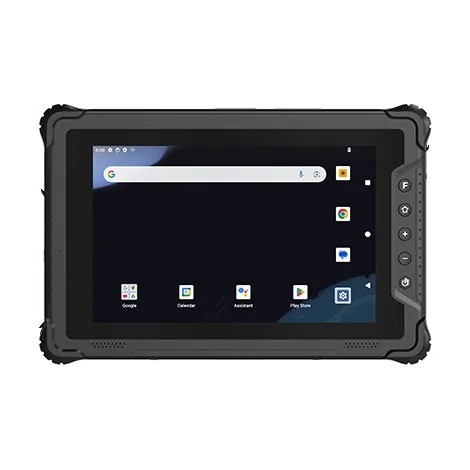
| Yard / gate | Container and trailer ID outdoors, all weather | Sunlight on screen, cold, dust, drops | Rugged tablet or vehicle terminal |
Specifying one device for all five is how projects end up with a fleet that is over-built at the dock and under-built in the rack. The cheaper route is two or three models that share batteries, cradles and a firmware branch.
Goods-in: the label decides, not the brand
Receiving is where the label quality is worst. Pallet labels are printed at the supplier, often on a worn thermal printer, and arrive scuffed, wrapped in shrink film or half-covered by tape. A device that reads a perfect test label in a showroom proves nothing here.
Three practical checks before you sign:
- Read the real label, at the real distance. Send the integrator a photo of a typical pallet label and the height it is scanned from. Ask for a video of the device reading it, not a datasheet range.
- Test in the door glare. Dock doors are open; sunlight and wet floors are normal. A screen that is unreadable at 11 am is a safety problem by noon.
- Check the cradle, not just the gun. In a busy dock the device lives in a cradle between scans. Cradle contacts and charging current decide uptime more than the scanner engine does.
High rack: the single biggest mis-specification
The most common warehouse complaint we hear is "the scanner will not read the top location". It is almost never a software problem. A standard 2D imager is comfortable to about 4–5 m on a good label. Above that, two options exist and they are not interchangeable:
- A long-range 2D engine. Reads to roughly 8–12 m, keeps the barcode label workflow, needs a steady hand and a visible line of sight. Best where labels are already barcoded and operators can aim.
- UHF RFID. Reads a tag, not a line of sight, and can read many at once. Best where you control the tag (own cartons, own pallets, own assets) and can afford to tag at the source. Read range to 15–20 m is realistic with a 20 m-class handheld, but metal and liquid change everything — see the RFID note in this series.
If the racking is already labelled with barcodes and the WMS expects barcode input, a long-range imager is the lower-risk upgrade. If pallets are tagged for a customer or a retail programme, the RFID route may remove the manual scan entirely.
Pick and pack: ergonomics beats specifications
Picking is the task with the most scans and the least tolerance for friction. Operators are not comparing processors; they are comparing how their wrist feels after six hours. The decisions that matter:
- Screen and keys. A 5.5–6" screen fits a pick list without scrolling; a physical keypad or well-placed scan key keeps gloved hands working.
- Battery strategy. A hot-swap pack and a charging bank beat a bigger battery. One spare per device, charged in the cradle, removes the end-of-shift battery argument.
- Weight and balance. A pistol-grip handheld balances better for long sessions than a slab phone held at the top. Try both for a full shift, not five minutes.
Packing and QA add a camera requirement. Damage photos and proof-of-condition are increasingly part of the record. A device with a competent rear camera and straightforward file hand-off avoids a second device at the bench.
Forklift and yard: vibration is the hidden killer
Vehicle-mounted terminals fail for reasons that never appear on an IP rating: continuous vibration, voltage spikes from the truck's electrical system, and brackets that loosen and drop the unit. The bracket and the power input are as important as the device. Ask for the mounting kit and the input voltage range, and insist on a vibration-rated bracket rather than a generic RAM arm. On the yard, a rugged tablet with a sunlight-readable screen and a wide temperature range is usually a better fit than a phone in a case.
The network nobody specified
A warehouse is a radio-hostile building: steel racking, foil-lined insulation, cold rooms and constant movement. Wi-Fi coverage drawn on a floor plan is not the coverage at the top of aisle 14. Before blaming the device:
- Walk the aisles with a site survey app and record dead spots at rack height.
- Confirm the device supports the Wi-Fi standard and bands the access points actually use (2.4/5 GHz, and 802.11ac or better).
- For yards and remote sites, decide early whether 4G/5G is the fallback and whether the device has the right bands for the local carrier.
Southeast Asia: heat, humidity and the factory next door
Much of the new warehouse capacity in the region is in Vietnam, Thailand, Malaysia, Indonesia and the Philippines, and the conditions are harsher than a European distribution centre. Three things change the specification:
- Humidity and condensation. A device that is merely splash-proof fogs internally when it moves from an air-conditioned office to a humid dock. Look for IP67 and a stated operating humidity range, and a sealed connector cover that survives daily opening.
- Heat. A black device left in a cab or on a dock in the sun can exceed its operating temperature before it is switched on. Wide-temperature ratings and a light-coloured body help; a shaded charging station helps more.
- The factory next door. Many "warehouses" in the region are attached to a production line — incoming components, WIP and finished goods share the same building. That means dust, vibration and, in some plants, classified areas. If the building has a hazardous-area zone, the device must be certified for it, not merely "rugged" — the two are not the same thing.
A short buying sequence that avoids the usual rework
- Map the five zones and the label type in each.
- Confirm the WMS integration pattern with the software vendor, in writing.
- Pick one primary handheld family and one vehicle/tablet line, sharing accessories.
- Get a sample of each, on your labels, in your aisles, for a full shift.
- Only then negotiate volume.
Hardware is the cheap part of a warehouse programme. The expensive part is the week the line stands still because the scanner would not read the label the supplier actually prints.